The idea
A meeting lasts an hour. Then the real work begins: writing the minutes, assigning tasks, copying figures into a spreadsheet, building slides for the advisory board. It often takes longer than the meeting itself.
For this case I went back to Kroll Facility Services, the made-up company from my mockumentaries. This time without a punchline: management and department heads review the third quarter. Revenue, earnings, sick leave, unpaid invoices, prices. 47 minutes, nine voices, about 7,000 words. Everything else was to grow out of this one transcript.
How a transcript comes about
Transcripts like this can be made with many tools today, for example Microsoft Copilot, Notion, TurboScribe or ElevenLabs. You record either directly in the tool or with any ordinary voice recorder on a smartphone.
Important: everyone in the room has to agree to being recorded. In the Kroll meeting the head of IT asks for that consent in the very first minute, one person at a time.
One extract, six formats
The most important step is invisible. Before a single document exists, the assistant draws a structured extract from the conversation: figures with actual, plan and prior year, decisions, tasks with a name and a date. Every line carries the time stamp of the passage it rests on. If that passage is missing, the build stops.
Every format comes from this one extract. If a figure changes, it changes everywhere. And anyone who wants to know where a figure comes from finds the time stamp right next to it.
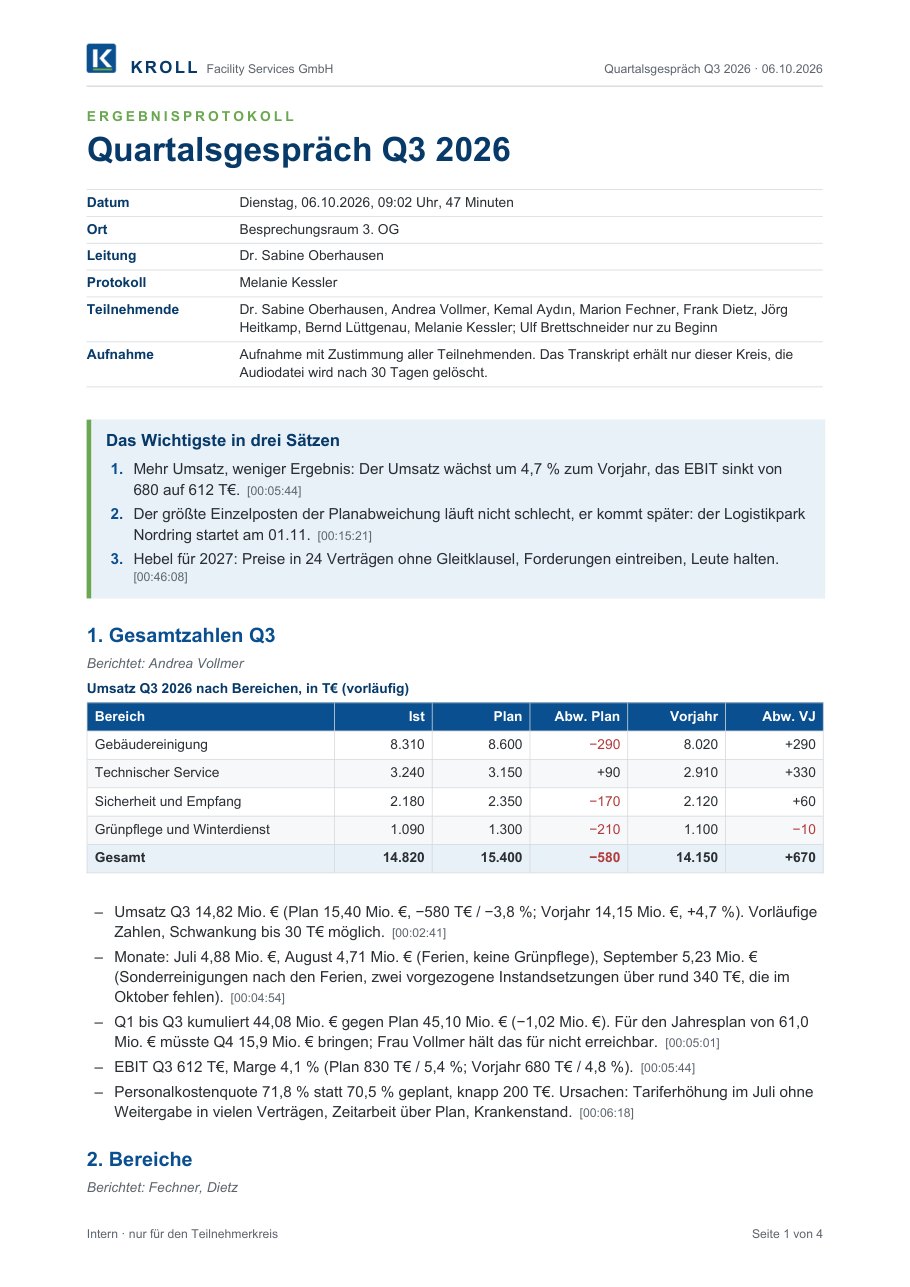
The minutes are a Word document in Kroll’s house style with key points, agenda items, five decisions, fifteen tasks and the agreements that were not decisions. Each point notes in small type where it sits in the conversation. Two CSV files for Excel come with it, one with the tasks and one with 45 figures.
Minutes as Word · as PDF · Tasks as CSV · Figures as CSV
Slides in HTML
I build slides in HTML. PowerPoint would work too, of course. My reason for HTML is structure: headings, figures and tables sit in the file as readable text, and any machine can work with that. A PowerPoint file is a package of many XML parts in which the text breaks up into layout fragments. A PDF often only knows characters at positions; which figure belongs to which column, a machine first has to guess again. At Kroll there is more: the charts are calculated from the same figures as the minutes, and every slide names the passage in the transcript it comes from. The slides still print to PDF.
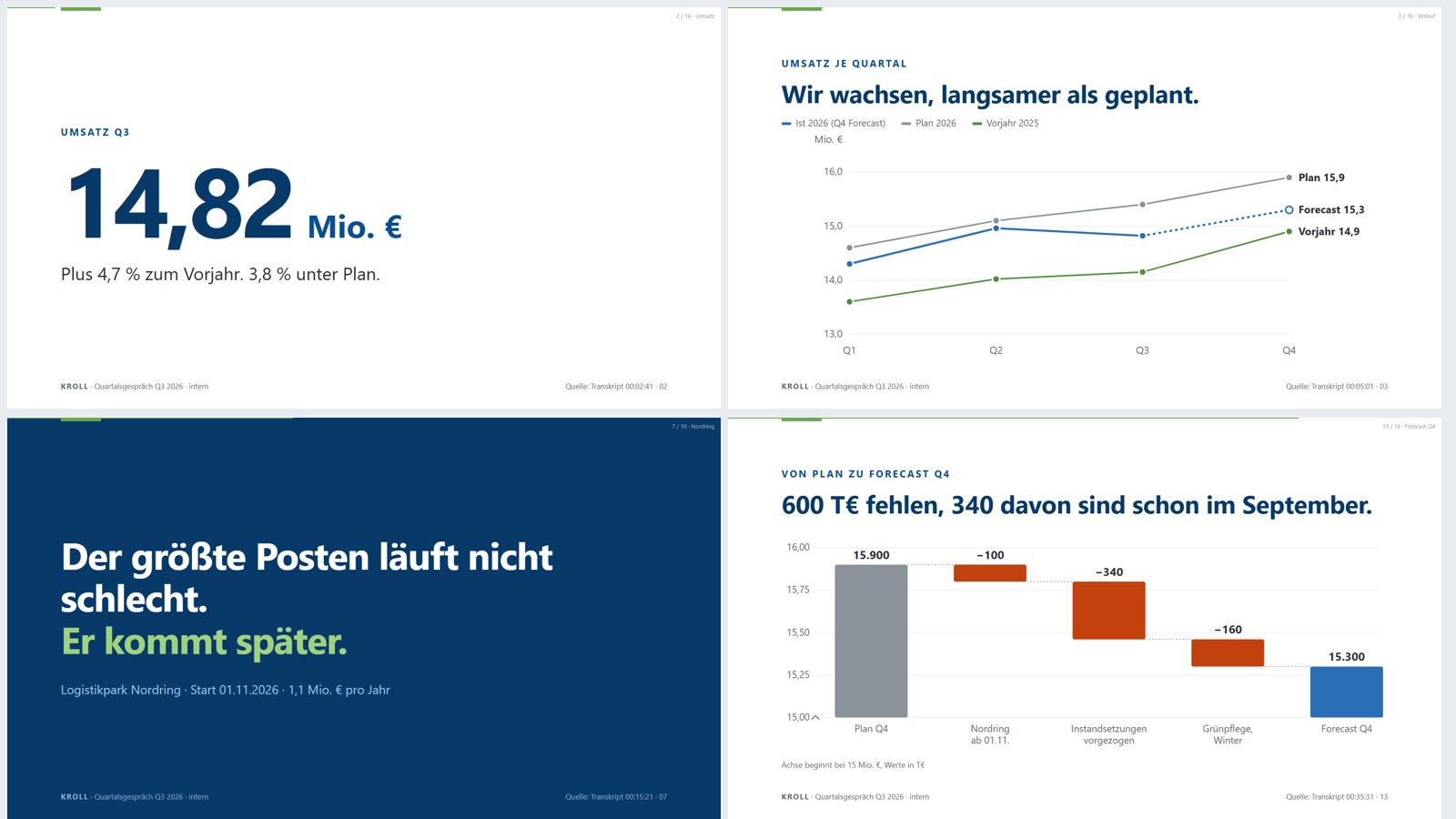
Sixteen slides, one statement each, sixteen words on average. A script checks that nothing on any slide runs over the edge. That was needed: on two chart slides the content was too tall and pushed the headline out of the type area.
Open the slides (arrow keys, F for full screen) · as PDF
Charts and tables
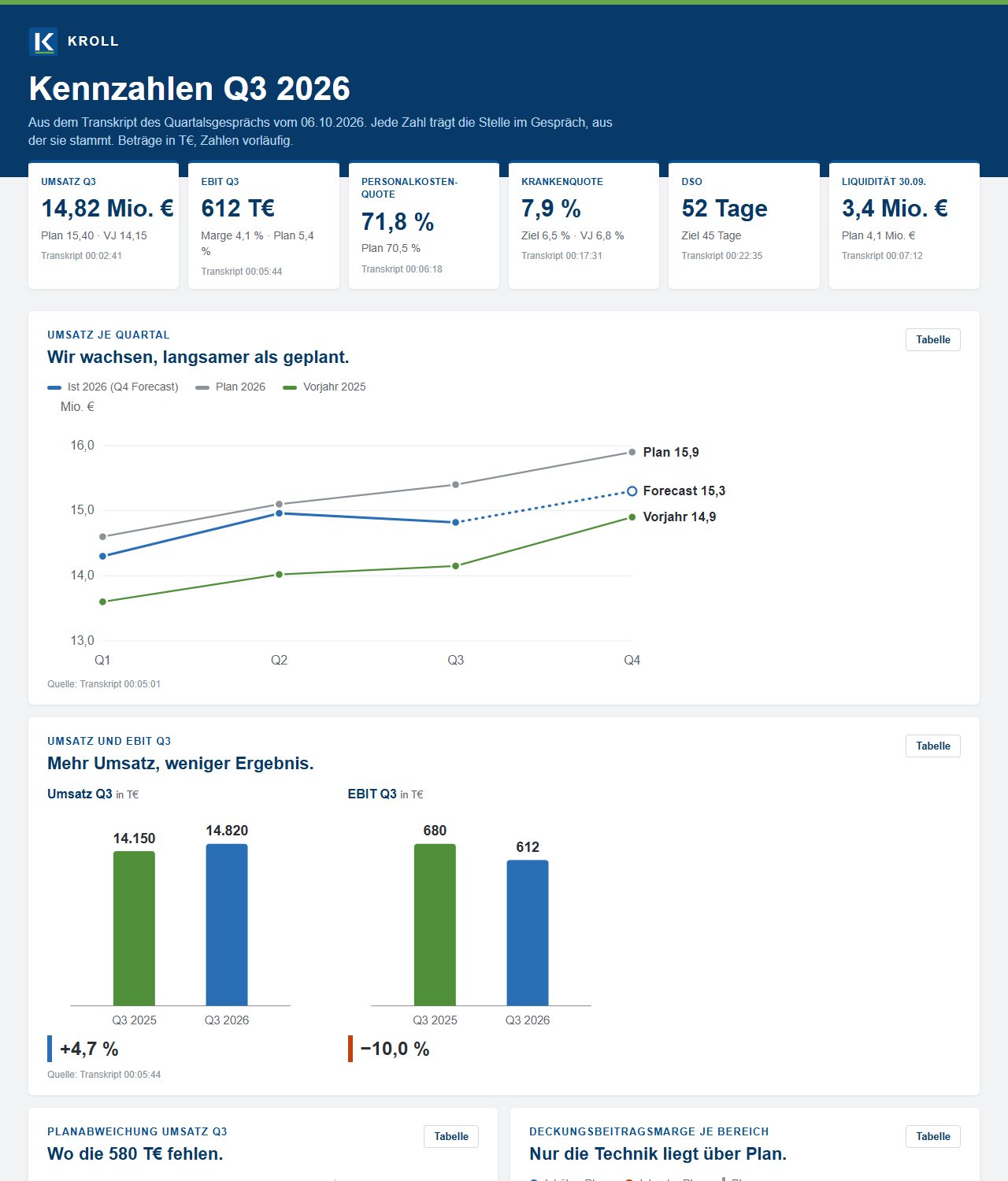
As a bonus there is a figures page: key figure tiles, six charts with hover details and a table view, all 45 figures to filter, and the task list by person. It works on a phone too.
The film
The infographic film above is not a generated video. It is motion design: an HTML stage where numbers count up, lines draw themselves and bars grow, rendered frame by frame at 60 frames per second. The movements are tied to the timing of the spoken words. The “+4.7%” arrow appears exactly on “mehr” (more), and each of the three levers arrives with its own word.
The voice is mine, as a clone of my ichbinsprecher.de brand voice. In the first sentence the speech recognition heard “Crawl” instead of “Kroll”. The sentence was spoken again, with “Kroll” as a word of its own. Three versions followed. After the first I wanted more art direction and a smoother infographic. The second got a fixed grid, softer motion and transitions that carry one image into the next. In the third the voice became eight percent faster.
A script also checks that everything stays in frame. It scans the film every quarter of a second.
In everyday business
A workshop case is not a working day. So I calculated how the quarterly review would run in a real company: eight participants, a one-hour meeting, then transcript, minutes, review by everyone, slides and film, each with a round of corrections. The templates already exist; it is the second quarter. Hourly rates as full employer costs: €90 for the management circle, €55 for the assistant.
| Step | With AI | Traditional |
|---|---|---|
| Meeting, 8 participants | 8:00 h | 8:00 h |
| Transcript | 0:15 h | – |
| Minutes | 0:40 h | 2:30 h |
| Review by everyone | 3:10 h | 4:05 h |
| Slides incl. review | 1:30 h | 6:30 h |
| Film incl. review | 1:40 h | usually none |
| Person hours | 15:15 h | 21:05 h |
| Staff cost | ≈ €1,230 | ≈ €1,700 |
| Direct cost per meeting | ≈ €8 | – |
Depending on the tool, the transcript costs almost nothing. In Teams it is part of Microsoft 365, TurboScribe charges a flat 20 dollars a month, ElevenLabs bills under 40 cents per hour of audio. The minutes with Opus 5.5 cost about 13 cents as a plain call, about €2 with the Word build and a source for every line. An agency film of this kind would cost several thousand euros, which is why it usually does not exist.
The saving is almost six person hours per quarterly review. Cost is the smaller issue. What matters more is where everyday use gets stuck:
- Recording and consent. Everyone has to agree. In Germany the works council also has to be involved as soon as a tool can evaluate behaviour or performance. You settle that once, not before every meeting.
- Where the data lives. A quarterly review contains staff and customer data. Which tool is acceptable is decided by IT approval. At Kroll the recording stays on the company’s own server. A cloud service would not fit that.
- The review stays the biggest block. Everyone spends a good three hours reading and commenting. AI barely shortens that. It makes it easier, because every line points to a moment in the conversation.
- The film is the least practical part. It needs a tool chain that an ordinary office PC does not have. With a finished template it costs little; without one it is a project. In an office it is more realistic to export PowerPoint as a video and lay the voice underneath.
Setting up the templates once costs roughly what this case cost: just under two and a half hours and a few euros.
A look at the case
In this case the work after the meeting costs next to nothing: about €1.25 and just under two and a half hours, most of it spent looking. In everyday business the process saves almost six person hours per meeting, and at the end there is a film that would not exist otherwise.
The machine can read, sort and calculate. Weighing things up stays with people: what matters, what was decided, what do we show the board? And before all of that comes a question no machine asks: does everyone agree that we record?
What this means for an organization
Strategy. The time saved is the smaller result: almost six person-hours per quarterly meeting, staff costs down from about €1,700 to about €1,230. The bigger one is that a meeting becomes a source. One hour of conversation yields minutes, figures, slides and a film that did not exist before. A company that reports this way talks differently to its board and its staff.
Role. With AI, the minutes take forty minutes instead of two and a half hours. What is new is the work before and after: maintaining templates, checking the evidence.
Process. Three things are settled once, not before every meeting: consent to recording, the involvement of the works council, IT approval of the tool. Review remains the largest block at just over three hours. It gets easier because every line points to a moment in the conversation.
What stays human. Weighing. What was decided, what was only discussed, what does the board see? That is a leadership decision. The machine prepares it. Someone who answers for it has to make it.